Analyse experte avec des avis d’utilisateurs Hostinger vérifiés
I registered a new Hostinger account, deployed a live Next.js app straight from GitHub, and pushed the built-in speed test and AI support with a real technical question about ISR caching. Deployment matched the landing page claim. One gap only turned up once I dug into the diagnostics.
I registered a new Hostinger account, deployed a live Next.js app straight from GitHub, and pushed the built-in speed test and AI support with a real technical question about ISR caching. Deployment matched the landing page claim. One gap only turned up once I dug into the diagnostics.
Hostinger is a Lithuania-based web hosting company known for shared hosting and VPS plans, and its Next.js hosting product is a newer entry built around Node.js deployment rather than a general-purpose server. I reviewed it because the pitch, deploying a production Next.js app without managing infrastructure, is a real shift from how Hostinger’s other hosting works, and it deserved a real test rather than a read of the landing page.
Deploy Next.js Apps Fast with Hostinger
Launch production-ready Next.js applications through Hostinger Web Apps hosting with GitHub integration, managed SSL, CDN, automatic backups, and a streamlined deployment workflow.
Kodee gave accurate, deploy-ready technical answers
Built-in speed test scored 100 desktop
Free domain, SSL, and email bundled in
GitHub integration with automatic deployments included
Cons
No dedicated Web Apps knowledge base category
Performance help links only cover WordPress
Tip Skip the temporary subdomain once you deploy. Connect the free domain bundled with your plan right away so your production URL doesn’t quietly stay on a hostingersite.com address.
Rating Breakdown
To score Hostinger’s Next.js hosting, I applied HostAdvice’s rating methodology, the same standardized system used across every review on this site, so the numbers below reflect real testing rather than the claims on Hostinger’s own landing page.
Kodee answered a real technical question correctly and honestly
Overall
9.3/10
A fast, well-built deploy pipeline let down only by thin docs
Choose the Right Hostinger Plan for Next.js
Compare Business and Cloud Startup plans for Next.js hosting, with scalable CPU and RAM, free domain and email, managed SSL, CDN, and GitHub deployment included.
Hostinger sells Next.js hosting as two tiers under its Web Apps hosting line, Business and Cloud Startup, both built around Node.js deployment rather than a general VPS. Business covers a handful of Web App slots and a moderate resource allocation, while Cloud Startup roughly doubles CPU and RAM, adds a dedicated IP, and includes priority 24/7 support along with a traffic power boost for busy periods.
Billing runs across 1, 12, 24, and 48-month terms, with the deepest discount attached to the 48-month option, the same structure I saw on the Laravel VPS plans.
Money-back guarantee: This sits under Hostinger’s standard hosting refund terms rather than the VPS policy, meaning a straight 30-day window from the date of purchase with no 180-day cooldown between claims. That’s a real, meaningful difference from the VPS product, where a second refund inside 180 days gets rejected outright.
Free trial: I found no dedicated free trial for Next.js hosting, only the 30-day money-back guarantee.
Payment methods: Card (Visa, Mastercard, Amex, Discover), PayPal, Google Pay, AliPay+ China and Hong Kong, and Coingate for crypto. Crypto payments fall outside the refund policy entirely, so factor that in if the guarantee matters to your decision.
What’s bundled in: Every tier includes a free domain, free business email, and managed SSL certificates for the first year, plus the global CDN and GitHub integration at no extra cost. One nuance from the refund policy deserves planning around: a free domain claimed as part of a plan discount is non-refundable on its own, so canceling the hosting plan doesn’t guarantee you keep or reclaim anything tied to that domain.
Features
GitHub integration with automatic deployments
IDE-based deployment via Hostinger Connector
Global in-house CDN included free
Managed SSL certificates on every site
Malware protection enabled by default
Daily automatic backups included standard
Managed MySQL database available on request
Web application firewall included free
Unlimited bandwidth on every plan
Get Fast Next.js Performance Without Server Management
Hostinger manages the underlying infrastructure while giving your Next.js app built-in performance testing, CDN delivery, strong Core Web Vitals, and automatic optimization tools.
There’s no server to benchmark directly on this product, no SSH access, no root shell, nothing to run sysbench or fio against, since Hostinger manages the container underneath the app rather than handing you a VPS.
The performance test that actually applies here lives right on the dashboard, a built-in speed test that runs a Lighthouse-style audit against your live URL for both desktop and mobile.
I ran it against my deployed test app, blue-eland-230298.hostingersite.com, and treated the results as a real signal of how the app performs in front of an actual visitor rather than a synthetic server number.
1. Desktop Results
The desktop scan returned a perfect 100:
Metric
Result
Performance score
100
First Contentful Paint
0.4 s
Largest Contentful Paint
0.4 s
Speed Index
0.6 s
Total Blocking Time
10 ms
Cumulative Layout Shift
0
Every core metric here sits well inside the range Google itself calls good, not just passing. A Largest Contentful Paint of 0.4 seconds and zero layout shift on a freshly deployed, minimal demo app is close to the floor of what’s physically possible, so this result says more about the hosting layer adding no meaningful overhead than it does about the app itself being complex.
2. Mobile Results
Mobile came in slightly behind desktop, as expected on a more constrained device profile, but still landed in the top band:
Metric
Result
Performance score
98
First Contentful Paint
1.1 s
Largest Contentful Paint
2.2 s
Speed Index
2.3 s
Total Blocking Time
0 ms
Cumulative Layout Shift
0
A 2.2 second LCP on mobile still sits inside Google’s good threshold, and zero blocking time means nothing on the page delayed interactivity. The gap between desktop and mobile here reads as normal device-simulation overhead, not a real weakness in how the app is served.
3. Reading the Diagnostics
Both scans came with a diagnostics breakdown, and this is where the numbers need a second look rather than a face-value read.
Several items, document request latency, avoiding redirects, the network dependency tree, and reduced unused JavaScript on mobile, showed a score of 0. Read next to a 98 or 100 overall score, that looks contradictory at first. It isn’t. These are opportunity audits measuring potential savings, not a percentile grade, so a 0 here means the tool found nothing left to fix, the best possible outcome, not a failure.
A few diagnostics did land in genuinely middling territory, and I’d read these as real findings rather than noise:
Render-blocking requests: scored 50 on both desktop and mobile
Legacy JavaScript: scored 50 on both, flagging polyfills for older browsers that a modern deployment likely doesn’t need
Reduce unused JavaScript: scored 50 on desktop
None of these pulled the overall score down in any way that shows up in the number, but they’re the actual, specific areas a reader deploying their own project could trim if they wanted to push the desktop and mobile scores from very good to flawless.
One thing to flag plainly: every help link under the diagnostics panel, on both the desktop and mobile results, pointed to WordPress-specific content, “Speed up WordPress in 9 easy steps,” a WordPress image optimization guide, a WordPress speed video. None of it applies to a Next.js deployment. This is a real gap between the product and the tooling wrapped around it. The speed test itself works correctly against a Web App, but the advice attached to it hasn’t been adapted from the WordPress hosting product it was clearly built for first.
I also noticed the score here, 100 on desktop, ran slightly ahead of the 99 shown earlier on the general Hosting Management dashboard for the same site.
That’s normal run-to-run variance for a Lighthouse-based test rather than a real discrepancy, but it’s a reason not to treat any single score as a fixed number. Each Past Results table also logged only one entry apiece, since the app had just been deployed, so this reflects a single snapshot rather than a tracked trend over time.
Overall Verdict on Performance
For a product with no server access to benchmark directly, this is a legitimate and genuinely useful performance test built right into the dashboard, and the numbers it returned are strong on their own terms.
A 100 on desktop and 98 on mobile, with every core speed metric sitting in the good range, means the hosting layer isn’t adding meaningful overhead to a Next.js deployment.
The diagnostics breakdown holds up once you understand what the 0 scores actually mean, and the handful of genuine 50s point to real, specific places to trim rather than vague advice.
The one thing Hostinger should fix is the help content, since every optimization link pointed a Next.js developer toward WordPress guides that don’t apply to their stack at all. It doesn’t affect the accuracy of the score itself, but it undercuts the experience for anyone who clicks through expecting relevant advice.
Deploy Next.js from GitHub in Minutes
Connect a repository, review detected framework and Node.js settings, watch live build logs, and publish a working server-rendered Next.js app without managing a VPS.
I tested Hostinger’s Next.js hosting from a blank signup form through to a live, server-rendered app in the browser, since that full path is the real product here. Web Apps hosting lives or dies on how fast you get from “I have a repository” to “it’s running,” so I paid close attention to every click between registering and watching a build finish. I started with the account itself.
1. Registration
I opened the Next.js hosting landing page first, where the “Claim deal” button doesn’t drop you into checkout. It scrolls down to a pricing table instead, putting Business and Cloud Startup side by side before asking me to commit to anything.
I chose Cloud Startup for this test, since it comes with 10 Web App slots against 5 on Business, a dedicated IP, priority support, and a stated power boost for traffic spikes.
That took me into the cart, where everything sat on one screen:
Plan: Startup plan (Cloud Startup), with 1, 12, 24, and 48-month terms available and a “Best value” tag on the 48-month option, which I picked for the lowest published rate
Bundled extras: a free domain for the first year and free mailboxes, both already reduced to $0 in the order summary rather than added as upsells
Domain step: a search box right there in the cart to claim the free domain, instead of a separate step waiting later in checkout
From there, I moved into registration, and this time I built a new account rather than reusing one already signed in. The form offered three paths in: Google, GitHub, or email and password. I also had an optional phone number field and a checkbox for marketing messages over WhatsApp and SMS, unticked by default.
After registering, I landed on the billing address and payment screen, all on one page with no separate redirect:
Method
Speed
Card (Visa, Mastercard, Amex, Discover)
Instant
PayPal
Instant
Google Pay
Instant
AliPay+ China / Hong Kong
1 business day
Coingate (crypto)
1 business day
I paid by card, and the charge went through right away, not on a delay. A confirmation email landed within seconds, and I was dropped straight into hPanel with the account already active and the plan already provisioned.
How I found registration: This is close to the least friction a checkout can have. Pricing sits in full view before you sign up, the free domain and mailboxes are claimed automatically rather than pushed as an add-on, and the card charge is real and immediate rather than a placeholder step before some later confirmation. My one note for a reader is that the marketing consent box is opt-in and easy to skip.
2. Dashboard and Client Area
Once payment cleared, I landed in hPanel, Hostinger’s own account panel built to replace a third-party interface like cPanel. It’s the one place where every part of an account lives: hosting plans, domains, professional email, files, databases, and billing, all reachable without switching between separate logins for each product.
The home screen greeted me by name and led with a prompt bar, a text field where I could type a request in plain language rather than hunting through menus for it. Below that sat a row of shortcut buttons for the most common tasks: Get domain, Create website, Get email, Migrate site, Get VPS, and Try email marketing.
The left-hand sidebar is where the actual account structure lives, and I want to walk through it in full, since this is the menu I’ll be referring back to for the rest of this section:
Group
Items
Core
Home, Websites, Domains, Emails, More services
Favorites
Pinned shortcuts, in my case OpenClaw
Hostinger apps
AI Builder, Email marketing, Ecommerce
AI agents
Agent, Hermes Agent, n8n
Dev tools
VPS, GPU (Beta), API
That structure told me right away where a Next.js deployment would actually live. Websites, not Dev tools, is where Web Apps hosting sits, grouped with WordPress sites and other website types rather than filed under VPS or GPU, which are separate infrastructure products entirely.
Back on the home page itself, a banner offered a free email address and a free domain to claim, and a stack of promotional cards followed it for the AI website builder, AI agents, an ecommerce store builder, and an automation tool.
Further down, a to-do checklist nudged me toward finishing setup tasks, and a running list of every website, domain, and server tied to the account filled out the rest of the page, ending in a VPS table for anyone also running a server.
Next, I scrolled past all of it toward Websites in the sidebar, since that’s where the actual deployment work would start.
What I thought about the dashboard: hPanel earns its reputation as a genuine replacement for a traditional control panel rather than a thin wrapper around one, since domains, email, billing, and every hosting product sit under the same login and the same sidebar.
The home page itself is busier than it needs to be for a reader who signed up purely to deploy a Next.js app, with several promotional cards to scroll past before reaching Websites. That’s a minor detour rather than a real obstacle, since the sidebar keeps every product, including the one you actually paid for, one click away at all times.
3. Deploying Your App
With the sidebar mapped out, I clicked into Websites and found my Cloud Startup plan already listed, empty, with an “Add website” button sitting next to it.
Clicking Add website opened a menu with four paths:
AI Builder: describe an idea and let AI build the site
WordPress: for CMS-driven sites
Custom PHP/HTML website: upload code or install another application
Deploy Web App: deploy from GitHub or upload files directly
I picked Deploy Web App. Then I was asked for a domain or subdomain, with a clear “Use temporary domain” link for anyone not ready to connect a real one.
I went with the temporary domain to keep this test focused on the deployment itself rather than domain setup.
Next, I reached the import step, with Import Git repository marked Recommended next to Upload your files, and a third path underneath both for deploying straight from VS Code, Cursor, or Claude Code through the Hostinger Connector.
I chose GitHub. Since my account was already connected, the repository list loaded immediately rather than sending me through an authorization screen first. A person connecting GitHub for the first time would see that authorization step here instead.
I picked a test repository, hostinger-nextjs-demo, and clicked Deploy.
That opened a build review screen rather than kicking off the deployment blind, with the Framework preset field already set to Next.js, the branch as master, Node version 22.x, root directory as ./, build and output settings default for Next.js, and no environment variables set, with an Add option next to each field.
Next.js was picked up correctly without me touching a dropdown, and every setting on that screen stayed editable before I committed.
After that, clicking Deploy opened a live progress screen with a percentage counter and an expandable Build logs panel that showed real npm output as it ran, package counts, vulnerability scan results, and all, rather than a generic spinner giving me nothing to look at.
The build finished in under a minute. The completed screen showed a thumbnail of the live site, the deployed URL, a link back to the repository, and a Go to dashboard button.
I then opened the live URL myself, since a completed build screen isn’t proof the site actually works. The page rendered correctly and displayed a server-side timestamp confirming the render happened at request time, along with a working API route link, real evidence that server-side rendering functioned on the host rather than the app quietly falling back to a static export.
How I found the deployment process: This is the strongest part of the entire product. Next.js was identified correctly on the first try, the build settings stayed visible and editable rather than hidden behind defaults I had to guess at, and the live build log gave me something real to watch instead of a loading animation.
Total time from clicking Add website to a working, server-rendered app in the browser ran to a handful of minutes, matching the landing page claim rather than falling short of it.
The one thing to flag for any reader following the same path is that a temporary subdomain is not a permanent home. Connecting a real domain is a separate step you’ll still need to handle before sending anyone to the site.
4. Hosting Management
Once the app was live, I wanted to know where control actually sits for a deployed Web App, and how much of it you get without opening a terminal.
Clicking into the site from Websites opened its own dedicated dashboard, separate from the hPanel home screen I’d just come from, with a left-hand menu covering:
Dashboard
Deployments
Environment variables
Runtime logs
Hosting Plan
Performance
Analytics
Security
Domains
Files
Databases
Advanced
At the top of the Dashboard sat the site name, a Connected with GitHub badge, and a Redeploy button that reruns the last build without needing to push a new commit. Four status pills sat below it, Running, Auto-deployment, Malware protected, and CDN, all showing green.
That malware status is a real contrast to what I found testing Hostinger’s Laravel VPS, where the same feature shipped switched off by default and needed manual activation in a separate security tab. Here it came active out of the box, no digging required to find it.
Next, I checked the Last deployment card, which gave a genuinely useful audit trail: state, repository, author, branch, commit, deployment timestamp, the framework preset in use, and Node version, all in one place. For anyone working on a team, having the author and commit message logged right on the dashboard means you can tell who shipped what without opening GitHub separately.
Then I looked at the Essentials card, which grouped the daily-use tools together:
Database: connect a managed database with one click
Backups: run daily and automatic
File manager: opens directly in the browser
Runtime logs: monitor site processes and catch errors
Cache: clear-cache button and a no-cache preview option
Next to it, a Performance card showed a built-in speed score, 99 out of 100 on desktop in my test, with a button to run a fresh scan on demand. A resource usage panel closed out the page, tracking disk space, inodes, CPU, memory, and how many of the plan’s Web App slots were in use.
What I thought about hosting management: Control here is real, not decorative. Environment variables and database connections both get their own entries in the sidebar rather than being buried behind a separate control panel or a terminal session, a genuine improvement over how app-level management worked on the VPS product I tested previously. The built-in performance score is a nice touch I didn’t expect on hosting built around getting a project live fast, since it gives you a benchmark without needing to run your own test.
Overall Verdict on Ease of Use
Hostinger’s Next.js hosting earns its “minutes, not hours” claim. Registration is fast and transparent about pricing before you commit, hPanel keeps every product under one login and one sidebar, and the deployment pipeline is the best part of the product. It reads your repository correctly, keeps build settings editable before you commit, and shows a real build log instead of a loading spinner.
Where the Laravel VPS review found a mislabeled button sending readers to a competing paid product, this Web Apps flow keeps deployment as the main event rather than an afterthought bolted onto a general-purpose server.
Once live, the site-specific dashboard puts database connections, environment variables, backups, and a built-in performance score in front of you without needing a separate panel or SSH session, and malware protection came switched on automatically rather than requiring a manual flip. My only real note for a reader is that the deployment lands on a temporary subdomain by default, so connecting a real domain is a step you’ll still need to handle yourself before launch.
Get Next.js Support with Hostinger Kodee
Use Hostinger Kodee for deployment-aware answers about Next.js, environment variables, ISR caching, redeployments, and troubleshooting, with Knowledge Base support when needed.
Getting help on this plan runs through three channels: Kodee, Hostinger’s AI agent built into the dashboard, a knowledge base of self-service articles, and human support as a fallback once Kodee can’t close something out.
I tested Kodee directly with a real technical question about my deployed app, then went through the knowledge base to see how well it actually covers Web Apps hosting rather than just VPS and shared hosting.
Before getting into what I asked, a quick rundown of what each channel is for:
Kodee (AI Agent): built to turn a plain-language question into a direct answer or action across your hosting account, rather than pointing you at a generic article. It reads live account and deployment data before responding, so answers can reflect the actual state of your site rather than a templated explanation.
Human support: available as an escalation path, but rare to need in practice since Kodee resolves most queries on its own.
Knowledge base: the self-service article library, organized into category tiles by product and topic.
1. AI Support (Kodee)
Kodee sits behind the Agent button at the top right of every hPanel screen. Opening it revealed something I hadn’t expected: the panel splits into two distinct modes rather than one general chat.
An “Agent” mode handles premium tasks like file creation and scheduled jobs, while a separate “Support” mode is narrowed down to quick help with your account, hosting, and websites. I stayed in the general Agent chat for this test, since that’s the entry point most readers will land on first.
I asked Kodee a two-part technical question about my live deployment:
“My Next.js app uses ISR with revalidate: 60 on a few pages. If I redeploy the app from GitHub, does the ISR cache get wiped and rebuilt from scratch, or does it persist across deployments? Also, if I update an environment variable in the dashboard without redeploying, does that change apply on the next request, or do I need to trigger a new build for it to take effect?”
Before answering anything, Kodee stated it was checking the live deployment details for my specific site, blue-eland-230298.hostingersite.com, rather than answering from a generic template.
The reply landed at 10:16, close behind the question, and split cleanly into the two parts I’d actually asked:
Part of my question
What Kodee said
ISR cache on redeploy
Treat a GitHub redeploy as a cold deployment. Hostinger doesn’t document ISR-cache persistence across deployments, so don’t count on existing entries surviving. Pages regenerate on first request, then follow the revalidate interval as normal.
Environment variables
Applying a change updates the running configuration without necessarily forcing a full rebuild, but a variable read during next build, a NEXT_PUBLIC_* value, or anything baked into static or ISR output needs a redeploy to take effect.
Runtime-only server variables
A reload of the app process can pick up the new value, but pages already generated by ISR may keep serving the old cached result until they revalidate or you redeploy or purge the cache directly.
Each point came with a link to Hostinger’s own documentation rather than a bare claim, one on redeploying a Node.js application and one on editing environment variables after deployment. Kodee closed with three quick-action suggestions: purging cache manually, viewing error logs, and triggering a redeploy from the dashboard.
What I thought about Kodee: This held up well against a question with real production stakes attached. It separated the two parts of my question instead of blending them into one flat answer, and it correctly flagged the build-time versus runtime distinction for environment variables, which is exactly the detail that trips people up when a config change silently doesn’t apply.
I also appreciated the honesty in the ISR answer. Rather than guessing at cache behavior Hostinger hasn’t documented, Kodee said plainly that persistence isn’t documented and told me not to rely on it, instead of inventing a confident answer to fill the gap. That’s a better outcome for a reader than a wrong answer stated with confidence.
2. Knowledge Base
I went into the knowledge base next, landing on a category overview page with tiles for each product area: Getting Started, hPanel, Hostinger AI Builder, Domains, DNS, Files Management, Email, MySQL Databases, Website, VPS, Agency Hosting Plans, Hostinger Reach, SSL Certificates, PHP, Profile Management, Billing, Affiliates and Referrals, Features, cPanel, and About Hostinger.
I looked for a category matching what I’d just tested and didn’t find one. There’s no dedicated Web Apps or Node.js hosting tile anywhere on that page. VPS, at 277 articles, and Website, at 110, are the closest fits, which means a reader browsing by category rather than searching could miss Web Apps content entirely just from how the page is organized.
I then searched “next.js” directly to see whether the content exists even without its own category. It does. The search returned 7 results:
How to fix the React server components vulnerability in Next.js (CVE-2025-55182 / CVE-2025-66478)
How to deploy apps built with Codex on Hostinger
How to migrate from Vercel to Hostinger
Connecting a Hostinger MySQL database to a Node.js application
How to redeploy a Node.js application
How to add a Node.js Web App in Hostinger
What to do if your hosting plan limits are reached in Hostinger
I opened the CVE vulnerability article to check the quality of what’s actually behind these results. It covers two real CVEs affecting React Server Components in Next.js 15.x and 16.x, lists the exact patched version for every release line from 15.0.5 through 16.0.7, and gives two update paths: an automatic codemod command, and manual install commands for npm, pnpm, yarn, and Bun individually. It also covers React Router users on unstable RSC APIs separately, includes a verification step to confirm the update landed, and links out to cleanup guidance for anyone whose VPS was affected before patching.
The article was marked updated one month before I read it, so this isn’t stale content sitting untouched since launch.
The one gap I noticed sits in the breadcrumb rather than the content. It’s filed under Support > VPS > VPS Management, even though the vulnerability applies equally to a Web App deployment like the one I tested. Site search surfaced it correctly regardless of category, so it isn’t buried, but a reader browsing the VPS section because they run a Web App, rather than a server, would have no reason to look there first.
What I thought about the knowledge base: The actual content is strong once you find it, current on a real security issue, specific down to individual patch versions, and written for more than one package manager rather than assuming npm. The organization is what lags behind. Web Apps hosting doesn’t get its own category despite being a distinct product with its own deployment model, so a reader has to already know to search rather than browse to find it.
Overall Verdict on Support
Support on this plan leans heavily, and correctly, on Kodee. It checked the live state of my actual deployment before answering, split a two-part technical question into two accurate answers instead of merging them, and was upfront about an ISR-cache detail Hostinger doesn’t document rather than guessing at it.
That combination, checking real deployment data plus honesty about the limits of what’s documented, is what separates a genuinely useful AI agent from a chatbot reciting articles.
The knowledge base backs it up with real depth once you search for it, current against active CVEs and specific down to exact patched versions, but Web Apps hosting still has no category of its own, so a reader relying on browsing rather than search could walk right past content that applies directly to them. For anyone deploying a real Next.js app on this host, Kodee is the support channel to reach for first, and a direct search of the knowledge base beats browsing its categories.
Run Next.js Without Managing the Infrastructure
Hostinger Next.js hosting is built for developers who want fast GitHub-based deployment, managed infrastructure, built-in performance tools, backups, CDN, and simple app management.
Yes. The deployment pipeline is the real product here, and it delivered exactly what the landing page promised: connect a repository, get a correctly detected build, and land on a live, server-rendered app in minutes rather than hours. Kodee backed that up with a genuinely accurate answer to a real production question about ISR caching, and the built-in speed test returned strong, honest numbers rather than an inflated marketing figure.
The rough edges sit in the supporting material rather than the core product. The knowledge base has no category built for Web Apps hosting, and every optimization link inside the built-in speed test points to WordPress guides that don’t apply to a Next.js deployment at all. Neither issue affects whether the hosting itself works, but both mean a reader troubleshooting on their own may need to lean on Kodee more than a well-organized help center.
This is an easy recommendation for a developer who wants a Next.js app live fast without managing a server, and who’s comfortable asking Kodee directly when the documentation falls short. A reader who wants deep, categorized self-service documentation for every edge case should budget extra time for trial and error, or plan to use AI support as the primary resource rather than a backup.
The section about renewal pricing is probably the most important takeaway. Introductory prices always look attractive, but it's the renewal cost that determines the real long-term value. I also found another review on Bestecision that breaks down the pricing, performance, and renewal considerations in detail.
J'ai perdu mes domaines en me connectant avec Google
En me loggant avec mon compte Google sans faire exprès, j'ai overridé mon précédent compte qui avait la même adresse mail, et perdu mes domaines. Voilà, rien que cette phrase devrait vous alerter sur leur service. Après un mois de va-et-vient avec le SAV, je n'ai toujours pas récupéré mes domaines à l'heure actuelle.
Incompétence ultime du SAV, gestion des comptes buggée, les prix sont juste là pour vous attirer dans leur piège, fuyez.
Nous sommes désolés d'apprendre que vous avez dû faire face à de tels désagréments. Nous nous en excusons sincèrement.
Merci de nous avoir laissé un avis et d'avoir porté cela à notre attention. Nous avons vérifié la situation et nos agents seniors ont été chargés de résoudre ce problème. Actuellement, nous pouvons constater qu'il a été réglé et vous pouvez utiliser votre compte sans problème.
Nous apprécions également beaucoup vos commentaires et nous aimerions en savoir plus sur vos impressions concernant cet avis. Si vous avez une minute, n'hésitez pas à nous contacter via quality@hostinger.com, et nous ferons tout notre possible pour vous satisfaire.
Nous espérons vraiment pouvoir améliorer votre expérience et faire grandir votre projet ensemble!
Nous vous souhaitons beaucoup de succès, L'équipe Hostinger
Cela vient d'être mon cas, merci de me contacter en urgence car je viens de souscrire à un contrat pour 4ans chez vous depuis hier (anciennement chez OVH), et cette première expérience est plus que déplaisante.
Une catastrophe. Et cela continue !Je ne peux pas écrire Single dans le service concerné
Il a fallu UN MOIS à Hostinger et de multiples chats durant des heures pour résoudre le problème qu'il avait avec FREE. Maintenat, on recommence avec l'impossibilité de créer les comptes Mails associés sur un Ipod de dernière génération et sur un Samsung J3 android. Le service client nous balade joyeusement. Nous décidons d'abandonner Hostinger pour un autre hébergeur avec lequel les problèmes se règlent en quelques jours. Je tiens à la disposition de ceux qui le veulent, le fichier de la tchat qui dura un mois (nonantehuit@free.fr). Cas d'école. Ma réclamation écrite au siège en Lituanie est resté lettre morte.
Merci pour vos commentaires et vraiment désolé pour les inconvénients que vous avez dû affronter.
En ce moment, nous pouvons voir que les problèmes de webmail que vous avez rencontrés ont déjà été résolus et pleinement opérationnels.
Notre service d'assistance est informé des problèmes que vous rencontrez avec l'installation de votre e-mail sur vos autres appareils. Un agent du succès client vous contactera sous peu pour vous donner des informations détaillées sur la façon de configurer l'email sur différents appareils. Si vous rencontrez des problèmes lors de la configuration, n'hésitez pas à contacter notre équipe du service clientèle par le chat en direct ou via support@hostinger.com
Nous sommes désolés que cette situation ait duré plus que prévu, merci pour vos commentaires et notre équipe se chargera de faire en sorte que cette situation ne se reproduise plus pour vous.
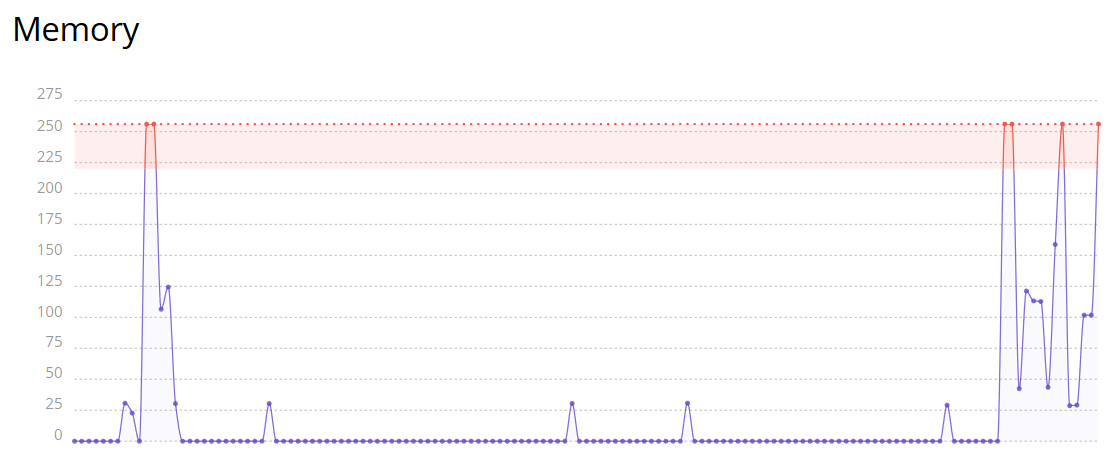
J'avais tout d'abord été attiré par une offre soit disant exceptionnelle d'un hébergement à 80ct/mois. C'est alors que les problèmes commencèrent... Mon site est extrêmement lent (environ 30sec de chargement en moyenne), horrible pour une utilisation avec Wordpress, et pire parfois je recevais des messages comme quoi il n'y avait pas assez de ressources. Je me suis alors dit "Bon ça va j'ai 3 mois a attendre et je change d'hébergeur", c'était sans compter sur un renouvellement automatique qui m'as prélevé 18euros (plus de reduc bien sur) pour 3 mois de plus et toujours autant de latence à ce jour. Petite précision concernant les lag en fait ce n'est pas étonnant, la RAM est bloquée à 256Mo pour un hébergeur qui a soit disant "l'esprit de la performance". Pour conclure entre fausses réductions, avis mensongers sur leur site, et une latence phénoménale, je vous déconseille très fortement cet hébergeur.
Nous sommes vraiment désolé d'entendre parler de votre expérience avec notre plan Single (Unique). Il semble que votre site Web nécessite plus de ressources que cette plan pourrait vous suggérer, ce qui est une bonne chose, car il indique que votre site Web est en croissance! Nous nous efforçons toujours de fournir la meilleure expérience possible et nous avons élaboré des plans différenciés pour tous types de sites Web.
Il y a aussi des alternatives au lieu de choisir le plus gros plan - Nous vous recommandons vivement d'optimiser votre site Web pour atteindre la meilleure vitesse possible. Si vous avez besoin d'aide, nos agents de réussite client sont à votre disposition! Nous vous avons déjà contacté avec les meilleures options pour vous.
Nous nous ferons un plaisir de vous aider à trouver une solution à votre cas.
Alors personnellement, mon histoire avec cet hébergeur est un peu longue lol ! J'ai commencé avec Hostinger sur de mauvais sentiments : je trouvais ça lent ! Bon je n'ai pas baissé les bras et j'ai demandé au support pourquoi c'était lent. Et heureusement ils m'ont répondu dans les minutes qui suivaient. En gros pour vous faire court, il y avait une mauvaise configuration sur mon serveur, qui apparemment était passé à côté du service d'administration. Aie aie aie, je commençais à m'énerver ! MAIS, heureusement, le gars du support est venu à ma rescousse en me proposant une solution : ils allaient mettre le serveur en maintenance et virer tous les gens dessus en attendant que la panne soit résolue et bien sûr, ils nous ont assignés à un autre serveur. Résultat des courses : mon site web est beaucoup plus rapide et marche comme il le faut ! Et donc je recommande cet hébergeur, déjà pour sa rapidité, mais surtout pour l'efficacité du support qui est venu m'aider en 2 temps 3 mouvements. testez par vous mêmes et faites votre choix, personnellement, j'ai déjà fait le mien !
Toi t'es bon. T'es juste un gars d'Hostinger pour faire des faux avis !! Pas très malin d'utiliser encore la même photo que celle du dessus. Tu fais hontes. Honte à Hostinger !!!!
Toi je vais t’arracher ta grande gueule la photo est un avatar qui m’appartient et le mec du dessus C MOI pauvre con ensuite un faux avis ??? Je dis ce que je pense comme tous autres. Donc c’est plutôt toi qui fais honte à hostinger à emmerder les gens pour rien
J'ai actuellement un serveur VPS chez eux et il marche. Je n'étais pas trop convaincu de prime abord puisque l'interface était assez douteuse. Mais je suis resté un peu pour être sûr. Ayant travaillé dans l'informatique, je vous recommande cet hébergeur puisque contrairement à ses concurrents il justifie son prix à la hauteur de ses services. Après, c'est vrai que c'est un peu plus cher. Mais chacun son avis sur l'importance de la qualité quand on fait quelque chose d'au minima professionnel.
Yes. Deployment from GitHub correctly detected Next.js and the Node version without manual setup, the app went live with working server-side rendering in minutes, and Hostinger’s Kodee AI assistant gave an accurate, deployment-aware answer to a real production question about ISR caching.
How is Next.js hosting different from Hostinger's VPS hosting?
Next.js hosting handles the build process, runtime, and server management for you, so there’s no OS, Node version, or process manager to maintain yourself. A VPS gives you full root access instead, which means more control but also more setup and ongoing maintenance.
Can I deploy a Next.js app from a private GitHub repository on Hostinger?
Yes. Connecting your GitHub account and authorizing access to a private repository works the same way as a public one, and you can pick the branch you want to deploy from directly during setup.
Does Hostinger offer a free trial for Next.js hosting?
No dedicated free trial exists for Next.js hosting. Hostinger backs every plan with a standard 30-day money-back guarantee instead, with no cooldown period between refund requests the way its VPS plans have.
Can I get a refund on Hostinger's Next.js hosting?
Yes, within 30 days of purchase under Hostinger’s standard hosting refund terms. Payments made through cryptocurrency are excluded entirely, and a free domain claimed as part of a plan discount is non-refundable on its own.
HostAdvice.com fournit des critiques professionnels d'hébergement web totalement indépendantes de toute autre entité. Nos avis sont impartiaux, honnêtes, et les mêmes critères d'évaluations sont appliqués à toutes les sociétés examinées.
Bien qu'une compensation financière soit reçue de la part de quelques hébergeurs apparaissant sur le site, la rémunération de services et de produits n'influence en aucun cas le sens et les conclusions de nos avis. Celle-ci n'affecte pas non plus le classement de certains hébergeurs. Cette rémunération couvre les frais d'achats de compte, de tests et les droits d'auteur versés aux critiques.